Solitaire: Classic Card Games
- 4.5
- Rating
- 10.00M
- Installs
- Free
- Price
 Analysis by App-foxy
I have spent time with Solitaire: Classic Card Games as a quiet, familiar card game for short breaks rather than as a demanding competitive experience. It is a free Klondike solitaire game from PLAYSTUDIOS US, LLC, aimed at Everyone and available on Android and iOS. The basic appeal is easy to understand: deal a hand, build the four foundations, and use the spare minutes in your day to solve one more layout.
That simplicity is also what makes it interesting to review from an inclusive point of view. Solitaire is often chosen by people who want control over the pace, a readable tabletop, and no pressure from other players. In my experience, this game works best when you want a calm card session that can end after one hand. It is less convincing if you need extensive personalization, dislike optional purchases, or want a deeper range of card variants.
How the game handles different players and situations
I find that the game’s familiar Klondike layout makes it easier to settle into a hand without first learning a new set of rules or navigating a complicated interface. That can help casual players and anyone who prefers a calm, self-paced activity, though comfort still depends on being able to see and select the cards clearly. The next section looks at how those practical details affect play.
You May Also Like

 AccuWeather: Weather Radar
AccuWeather Review: A Quick, Clear Forecast for Everyday Decisions
For everyday plans, the best forecast is the one you can understand quickly. AccuWeather makes rain timing, radar, and local conditions easy to act on, with a few trade-offs.

 Hill Climb Racing
Why Hill Climb Racing Still Turns Crashes Into One More Run
A tiny car, a bumpy hill and one more upgrade: Hill Climb Racing keeps resurfacing because its simple chaos makes every near-miss feel personal.

 AliExpress - Shopping App
AliExpress Makes Global Shopping Feel Personal, but Shoppers Bear the Risk
AliExpress turns a global marketplace into a pocket-sized discovery engine. Its reach is useful, its shopping loop compelling, and its trade-offs easy to miss.

 Lords Mobile: Kingdom Wars
Lords Mobile Is a Kingdom-Building Routine, Not a Quick Match
A case-by-case verdict on the building, battles, device demands, and social commitments that make Lords Mobile rewarding for some players and exhausting for others.

 PDF Scanner app - TapScanner
TapScanner Makes Paperwork Easier to Capture, Check, and Share
TapScanner makes scanning with a phone feel less like a rescue operation and more like a dependable step in getting work done. Its capture tools are useful, though not flawless.

 Block Blast!
 Shows How Much a Puzzle Game Can Leave Out
A quiet grid game shows why puzzle players increasingly value instant clarity, repeatable skill and low-pressure play—and where the genre still needs to catch up.
More From Our News Desk
View All News


Readability and navigation during a hand
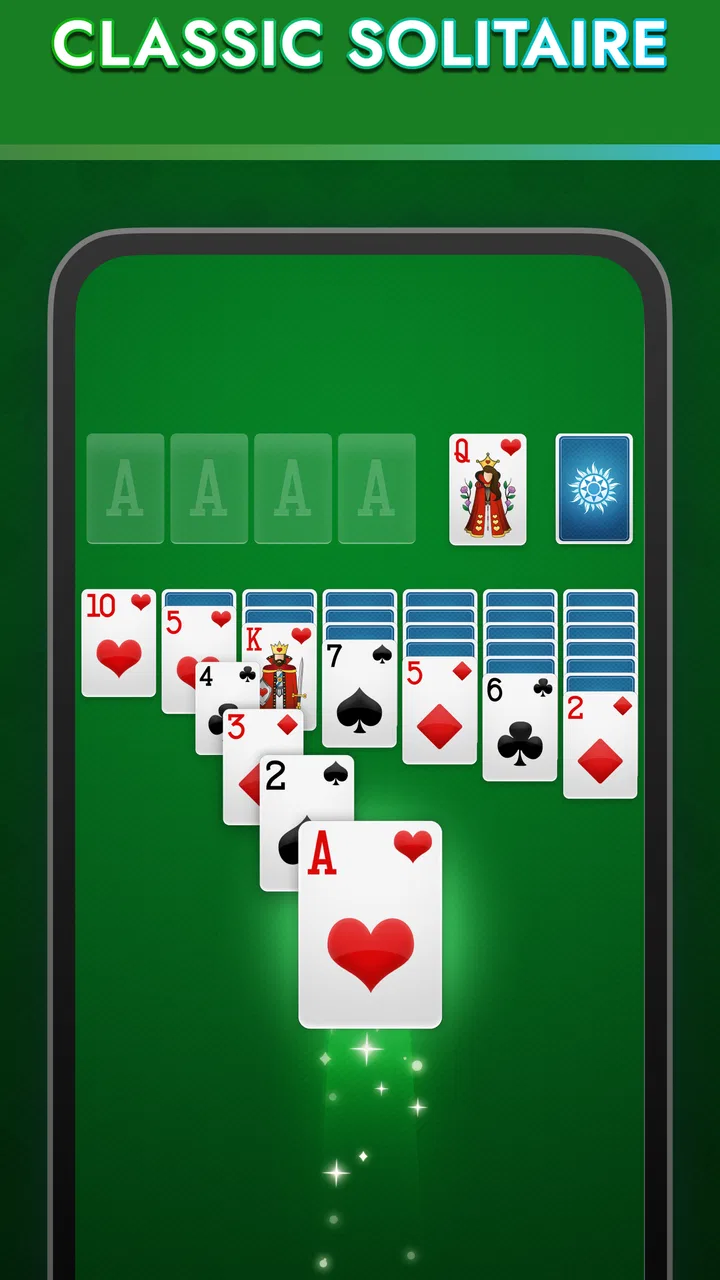
The central layout is immediately recognizable to anyone who has played Klondike with a physical deck. Cards are arranged into the tableau, stock, waste area, and foundation piles, so I never had to learn a complicated menu system before starting. That familiar structure matters: the game communicates its main task visually, and a returning player can usually begin a hand without searching through instructions.
The clean card-table presentation is one of the strongest parts of the experience. I can focus on the face-up cards and the available moves instead of managing a crowded interface. The design also suits people who prefer a single clear activity rather than a screen full of competing panels. Daily challenges add a reason to return, but they do not change the basic rhythm of arranging cards.
At the same time, readability depends on the device and on personal vision. Card suits, ranks, and colors carry essential information, so anyone who has difficulty distinguishing small symbols or similar colors should test the game on their own screen before committing to it. I would not assume that a clean appearance automatically means every card is equally easy to read. On a smaller phone, the tableau can feel more compressed than it does on a larger display.
Navigation is generally approachable because the game is built around one familiar activity. That makes it suitable for a first-time solitaire player who wants to tap through the basics without learning a complicated ruleset. The trade-off is that the simplicity leaves less room for people who want to reshape the interface around a particular need. A straightforward board is helpful, but it is not the same as a highly configurable one.
One useful habit is to pause before making a move when several cards are available. I found that looking at the whole tableau first is more reliable than repeatedly tapping the most obvious card. This is especially helpful for players who process visual information more comfortably in stages. Solitaire rewards a slower scan, and the game does not require quick reactions, so there is little reason to rush.
Motor demands and sensory comfort
Klondike is a good match for players who prefer deliberate interaction. The game is not based on rapid swipes, timed combat, or constant button pressing. I can plan a move, make it, and reconsider the next step without feeling that the board is punishing me for taking a moment. That low-pressure pace may suit people with limited dexterity or anyone who finds fast games tiring.
However, card placement still relies on accurate touch input. Moving a card from one pile to another can be awkward if the target area is small, the phone is being used one-handed, or the player has difficulty with precise taps and drags. A larger screen may make the columns easier to distinguish, while a phone held in a crowded setting can make every move less comfortable. This is a practical limitation rather than a flaw in the solitaire rules themselves.
I also see a meaningful difference between playing at home and playing while moving. At a desk or on a stable surface, the board is easier to inspect and touch accurately. On a bus, in a waiting room, or while standing, the same hand can become more frustrating because the device shifts and the card columns are harder to target. The game is calm, but the surrounding situation can still create motor demands.
For sensory comfort, the restrained card-table format is less intense than an action game filled with constant animation and sound cues. That makes it a reasonable choice when you want something visually focused and quiet. Still, I would use the phone’s own brightness and sound controls to create a comfortable setup, particularly during evening play. Those adjustments happen at the device level, so the experience will depend partly on the phone or tablet itself.
A practical approach is to play with both hands when arranging a complicated tableau: one hand can stabilize the device while the other handles the cards. I also recommend rotating the phone only if the layout remains comfortable after rotation; changing orientation is not automatically an improvement. The best setup is the one that gives you a stable view and enough room to select cards without repeated corrections.
Where it fits into everyday life
This is the kind of game I would open during a short, uncertain gap in the day. Imagine waiting for an appointment: I can begin a hand, solve a few moves, and stop when my name is called without disappointing teammates or losing progress in a shared match. The same applies to a quiet coffee break or a few minutes before bed, provided the screen is comfortable for that setting.
The daily-challenge element can give regular players a small routine. Instead of opening the game only when bored, you may have a particular hand or goal to return to. I like that this creates structure without turning solitaire into a social obligation. For someone who enjoys checking off a daily activity, that can be more motivating than an endless stream of identical random hands.
On the other hand, daily routines can feel restrictive to players who want complete freedom. If your ideal card game is a large collection of variants, this title may seem focused rather than expansive. Its identity is centered on classic Klondike play, so it is better suited to someone who wants that specific format than to someone shopping for an all-purpose card-game collection.
The game is free to start, which makes it easy to try without paying upfront. Optional in-app purchases range from $0.99 to $11.99 per item, so I would keep that in mind if you are choosing a distraction for a child or for someone who prefers a strictly no-purchase environment. The Everyone rating describes the intended content level, but it does not remove the need for the device owner to manage purchasing preferences responsibly.
Its long presence also helps explain why the game feels familiar rather than experimental. It was released on December 16, 2011, and the current version is 2.1.386.2. The Android requirement is 7.1 or later, which is relevant if you are installing it on an older device. I would check the phone’s operating-system version before recommending it to someone using legacy hardware.
What the numbers suggest, and what they do not
The game has earned a 4.5 average from around 388 thousand ratings, with more than 42 thousand written reviews and over 10 million installs. Those figures tell me that it has reached a broad audience and that the basic solitaire format works for many people. They do not mean every player will find the touch targets, visual presentation, or optional purchase model equally comfortable.
For me, the most important question is not whether the game is popular but whether its design fits the player. A person who wants a familiar, low-pressure card table is likely to understand the appeal quickly. Someone who needs large, highly customizable controls, alternative visual presentations, or extensive support for a specific disability should investigate the actual experience on their device rather than relying on the popularity figures.
Remaining barriers before you choose it
The biggest barrier is the dependence on visual card recognition. Even though solitaire rules are simple, success requires reading ranks, identifying suits, and tracking several columns at once. Players with low vision, color-vision differences, or visual fatigue may find that the board demands more effort than the relaxed theme suggests. A larger display can help, but it cannot guarantee that every element will be comfortable.
Touch interaction is another consideration. A player with tremors, reduced reach, or difficulty holding a phone steady may need more attempts to select and move cards. Because the game is turn-based rather than time-limited, mistakes are less stressful than in a fast game, but repeated mis-taps can still interrupt the calm experience. This is where a tablet or a stable stand may be a better choice than a small phone.
There is also a cognitive trade-off. Klondike is simple to learn, yet a difficult layout can require remembering which cards are hidden, which moves open a column, and whether using the stock now will block a better sequence later. Players who want a fully automatic, effortless distraction may prefer a simpler matching game. I enjoy the planning, but it is worth recognizing that “relaxing” does not mean mentally empty.
The purchase model may be a barrier for people who want every part of a free game to remain outside a spending decision. I would not hand the device to a child without first reviewing the device’s purchase controls. For adults, the sensible approach is to treat the free download as a trial: play enough to see whether the board, pacing, and presentation suit you before considering any optional spending.
Another limitation is breadth. If you compare this with a traditional deck, the physical version offers tactile feedback, larger cards, and no battery or touch-screen dependence. If you compare it with a broad digital card collection, another app may offer more variants in one place. This title wins through convenience and a focused Klondike experience, not through replacing every possible way to play cards.
Who I would recommend it to
I would recommend it to someone who wants a recognizable solitaire game for short, self-paced sessions. It is particularly suitable for players who enjoy arranging cards methodically, prefer playing alone, and appreciate a daily reason to return. It can also work well for a family member who already knows Klondike and wants the convenience of carrying it on a phone rather than keeping a deck nearby.
I would suggest trying it on the largest available screen if readability or touch accuracy is a concern. Before settling in, check whether the card faces remain clear at the device’s normal brightness and whether you can move cards without repeatedly missing the target pile. That small test is more useful than assuming the same experience will suit every phone.
I would steer a player elsewhere if the main requirement is extensive accessibility customization, a tactile card experience, competitive multiplayer, or many different card games in one download. A physical deck may be better for someone who finds touchscreens uncomfortable. A broader card app may be better for variety. A very simple matching game may be better for someone who does not want to plan several moves ahead.
My inclusive verdict
My overall impression is favorable, with a clear qualification: this is an approachable solitaire game, not a universal solution for every access need. Its familiar Klondike structure, unhurried pace, and focused presentation make it comfortable for many casual players. I especially value the fact that a hand can fit naturally into a waiting period without demanding rapid reactions or social coordination.
The best reason to try it is its calm, controlled pace; the best reason to test it carefully is its reliance on small visual cards and precise touch. That balance captures the experience better than the store summary alone. It feels welcoming when the board is easy for you to read, but the same design can become tiring when visual or motor demands are already difficult.
PLAYSTUDIOS US, LLC has kept the experience centered on the classic card activity, and the strong audience response shows why that formula remains appealing. I would download it for a familiar daily solitaire habit, use a stable setup when possible, and pay attention to the device’s purchase controls. If those conditions fit your needs, this free card game is a pleasant companion for quiet moments. If they do not, choosing a more adjustable or more tactile alternative would be the more inclusive decision.
FAQs for Solitaire: Classic Card Games
01What are the main features of Solitaire: Classic Card Games?
Solitaire: Classic Card Games offers a traditional solitaire experience with customizable card decks and backgrounds. It includes features like unlimited hints, undo options, and daily challenges to keep you engaged. The game also provides statistics tracking, allowing you to monitor your progress and improve your skills over time.
02Is Solitaire: Classic Card Games free to play?
Yes, Solitaire: Classic Card Games is free to download and play. However, it may offer in-app purchases for additional features or to remove ads. These purchases are optional and not necessary to enjoy the basic gameplay experience, making it accessible to all users without spending money.
03Does Solitaire: Classic Card Games require an internet connection?
No, Solitaire: Classic Card Games can be played offline, making it a great option for users who want to enjoy the game without an internet connection. This feature ensures that you can play anytime, anywhere, without worrying about connectivity issues or data usage.
04How can I customize my gameplay in Solitaire: Classic Card Games?
The game allows for a high degree of customization to enhance your playing experience. You can choose different card designs and table backgrounds to suit your preferences. Additionally, you can adjust settings like sound effects and animations to tailor the game environment to your liking.
05What kind of support is available if I encounter issues with Solitaire: Classic Card Games?
If you experience any issues with the game, you can access support through the app’s settings or the developer’s website. They typically offer a comprehensive FAQ section, troubleshooting guides, and customer support contact options to help resolve any problems you may face while playing.
Pros
- Simple and intuitive interface.
- Customizable card decks and backgrounds.
- Offline play available without ads.
- Smooth performance on all devices.
- Daily challenges add extra fun.
Cons
- Limited multiplayer options.
- Ads can be intrusive in free version.
- No cloud save for progress.
- Lacks advanced statistics tracking.
- Limited card animations.

Solitaire: Classic Card Games
Gallery